
How to reset an Airpod Charging Case?
Resetting your Airpod Charging Case can solve a variety of issues, from pairing errors to charging glitches. Whether your AirPods are not connecting to your device or the case is behaving unpredictably, a reset often restores normal function. For those looking for genuine replacement cases or parts, recellexchange.ca offers authentic solutions for AirPods, Beats, and Galaxy Buds, backed by a 90-day warranty for peace of mind.
Why Resetting Your Airpod Charging Case is Important
Resetting the Airpod Charging Case is a simple yet effective way to resolve minor software glitches. Over time, settings can become misaligned, causing issues such as one AirPod not charging or the case failing to connect to devices. A reset refreshes the system and ensures the AirPods and case pair correctly with your device.
Step-by-Step Guide to Resetting
Resetting your AirPod case is straightforward:
-
Place both AirPods into the Airpod Charging Case and close the lid.
-
Wait for 30 seconds to ensure the AirPods are fully seated.
-
Open the lid, then press and hold the setup button on the back of the case until the LED indicator flashes amber, then white.
-
Release the button. Your AirPods and case are now reset and ready to pair with your device again.
Using a genuine replacement case from suppliers like recellexchange.ca ensures that the setup button functions correctly and that the reset process works reliably. Counterfeit or worn-out cases may fail to reset, causing ongoing connectivity issues.
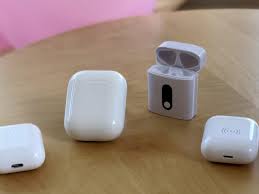
Pairing After a Reset
After completing a reset, you will need to pair your AirPods with your device. Open the lid near your iPhone, iPad, or other compatible device and follow the on-screen instructions. This process helps your device recognize the freshly reset Airpod Charging Case and ensures that the AirPods charge and connect as intended.
Troubleshooting Reset Issues
Sometimes a reset may not immediately solve the problem. If the LED indicator does not flash correctly, try the following:
-
Ensure your AirPods are seated properly in the case.
-
Charge the case for at least 15 minutes and try the reset again.
-
Inspect the case for dirt or debris that may interfere with the button or contacts.
If issues persist, replacing the Airpod Charging Case with a genuine part from recellexchange.ca may be necessary. Authentic replacement parts maintain compatibility and functionality, reducing the risk of repeated problems.
Benefits of a Genuine Replacement Case
A genuine replacement Airpod Charging Case guarantees that all features, including fast charging, pairing, and reset functions, operate correctly. Using authentic parts prevents potential battery issues, connection failures, and wear-and-tear problems commonly seen with counterfeit products. With a 90-day warranty, you have added security against early defects or malfunctions.
Tips for Maintaining Your Case
To avoid future issues with your Airpod Charging Case, keep it clean, avoid exposure to extreme temperatures, and handle the case gently when pressing the setup button. Regular maintenance ensures the reset function continues to work correctly over time. For those curious about how the reset process interacts with the battery system, lithium-ion battery design explains how power management helps protect internal components during repeated resets.
In summary, resetting your Airpod Charging Case is an essential troubleshooting step for connectivity and charging issues. Following the proper procedure ensures that your AirPods pair correctly and function reliably. For long-term peace of mind, consider sourcing genuine replacement cases from trusted providers like recellexchange.ca, which provide authentic parts with a 90-day warranty and reliable support for your earbuds.


Leave a Comment